Overview
Why the 4GB variant is the professional choice
While the UNO™ Q series offers versatility, the 4GB RAM / 32GB eMMC model is the definitive version for developers who refuse to compromise:
- Massive Memory: 4GB of LPDDR4 RAM allows you to run multiple Linux containers, Python scripts, and AI models simultaneously without bottlenecks.
- High-Speed Integrated Storage: Forget unreliable SD cards. The built-in 32GB eMMC ensures fast OS boot times and secure data logging.
- Advanced Multimedia: Smoothly handle dual-camera feeds and high-definition displays via integrated MIPI interfaces.
Dual-brain architecture: the best of both worlds
The UNO™ Q 4GB features a unique “Split-Processing” design that allows you to manage tasks where they belong:
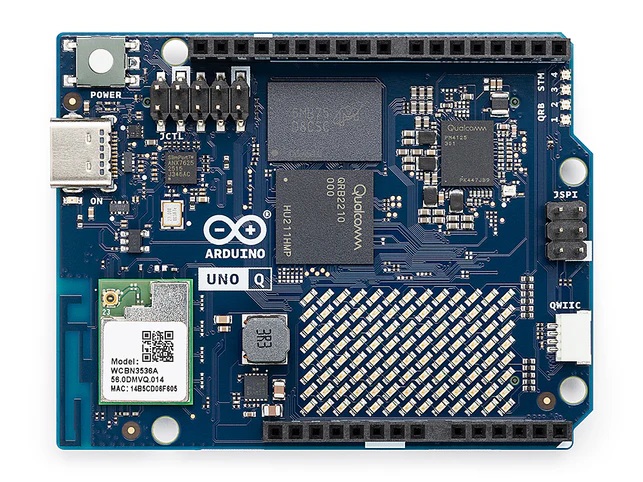
1. The High-Level Brain (MPU): Powered by the Qualcomm® Dragonwing™ QRB2210 (Quad-core 64-bit ARM® Cortex®-A53). It runs a full Debian Linux environment, perfect for AI frameworks, web servers, and complex data processing.
2. The Real-Time Brain (MCU): Powered by the STM32U585 (Cortex®-M33). It manages the I/O, sensors, and time-critical hardware tasks with the legendary reliability of the Arduino ecosystem.
AI Vision and Multimedia Ready
Bring your projects to life by adding “eyes” to your Arduino UNO™ Q. Thanks to the high-speed USB-C port and the power of the Qualcomm® quad-core processor, you can plug in a standard USB mini-webcam to unlock a world of possibilities. Whether you are implementing facial recognition with AI and Machine Learning, building a smart surveillance system, or streaming real-time video, the UNO Q handles it with ease. With native support for UVC webcams on Linux and seamless integration within Arduino App Lab, moving from image capture to data processing is faster and more intuitive than ever.
The Arduino app lab: your bridge to innovation
One of the most powerful features of the UNO Q 4GB is the Arduino App Lab. This software suite simplifies the management of your hybrid system:
- Simplified Interconnect: Skip the complexity of low-level coding. Easy, high-level management of Linux (MPU) and Arduino (MCU) communication, making integration faster than ever.
- Flexible AI Execution: Get your models up and running in seconds. Deploy directly to the Qualcomm® processor, utilizing its high-performance CPU and GPU architecture for efficient machine learning tasks.
- Real-Time Dashboard: Monitor CPU temperature, memory usage, and pin status via a sleek, web-based interface.
Applications & use cases
- Edge AI & Vision: Real-time object detection, facial recognition, and autonomous drone navigation.
- Industrial IoT Gateway: Securely aggregate data from local sensors and process it locally before cloud synchronization.
- Professional Prototyping: The perfect platform for building smart home hubs, media controllers, or advanced 3D printer interfaces.
| Microprocessor (MPU) | Qualcomm Dragonwing™ QRB2210: Quad-core Arm® Cortex®-A53 @ 2.0 GHz Adreno GPU 3D graphics accelerator 2x ISP (13 MP + 13 MP or 25 MP) @ 30 fps |
| Microcontroller (MCU) | STM32U585 Arm® Cortex®-M33 up to 160 MHz 2 MB flash memory 786 KB SRAM |
| RAM | 4GB LPDDR4 |
| Power Supply | From USB-C connector 5 V max at 3 A Input Voltage (VIN): 7-24 V |
| Storage | 32GB eMMC |
| USB | 1× USB-C port with host/device role switching, power role switch and video output |
| Connectivity | Wi-Fi® 5 2.4/5GHz with onboard antenna Bluetooth® 5.1 with onboard antenna |
| Interfaces | I2C/I3C SPI PWM CAN UART PSSI GPIO JTAG ADC |
| Video | Video output support via USB-C MIPI DSI pins on JMEDIA header |
| Extra | 4× RGB user-controllable LEDs 8×13 Blue LED Matrix 1x Qwiic connector voltage 3V3, I2C 1x User push-button JCTL: MPU Remote Debug connector |
| Audio | Microphone IN / Headphone OUT / Line OUT on JMISC |
| Dimensions | 68.85 mm x 53.34 mm (UNO form factor) |
| MPU Operating System | Linux Debian OS with upstream support |
| Real-time Operating System | Arduino Core on Zephyr OS |
| Containerization | Docker and Docker Compose support |
| Support Operating Systems for Arduino App Lab | Windows: Windows 10 or later (64-bit) macOS: macOS 11 or later (64-bit) Linux: Ubuntu 22.04 or later, and Debian Trixie (64-bit) |